Features
Everything that’s already inside.
This list only contains what works in the current development version. Things that are still being built are on the roadmap.
Automatic correction
One click on Auto analyses the photo and corrects white balance, lost colors, exposure, contrast and haze — as much as this particular photo needs.
- Water model Estimates the light path through water (depth + distance to the subject), using the camera’s depth sensor or your dive log when available — or set it by hand.
- Red rebuild Rebuilds red, orange and yellow from the remaining channels, only where they are actually missing.
- Knows its limits Measures how much correction a photo needs. Strong casts are fixed fully; already edited or neutral photos are left alone.
- Special situations Recognizes green or lake water, murky yellow-green water, red-filter shots, night and lamp shots, strobe light cones, the camera’s underwater mode — and photos taken above water.
- Open water stays blue Water is detected and protected, so it stays deep blue instead of turning grey or purple.
- Stays automatic while you edit Your sliders are offsets on top of Auto, which keeps measuring the result.
- RAW done properly For RAW files, white balance is solved in Apple’s RAW engine on the sensor data. Works with the RAW formats macOS supports; tested mostly with OM System / Olympus.
Editing tools
Two modes: Simple shows a few cards (Underwater Auto, White Balance, Recover colors, Remove backscatter, Reduce noise, Detail, Look). Pro shows the full toolset.
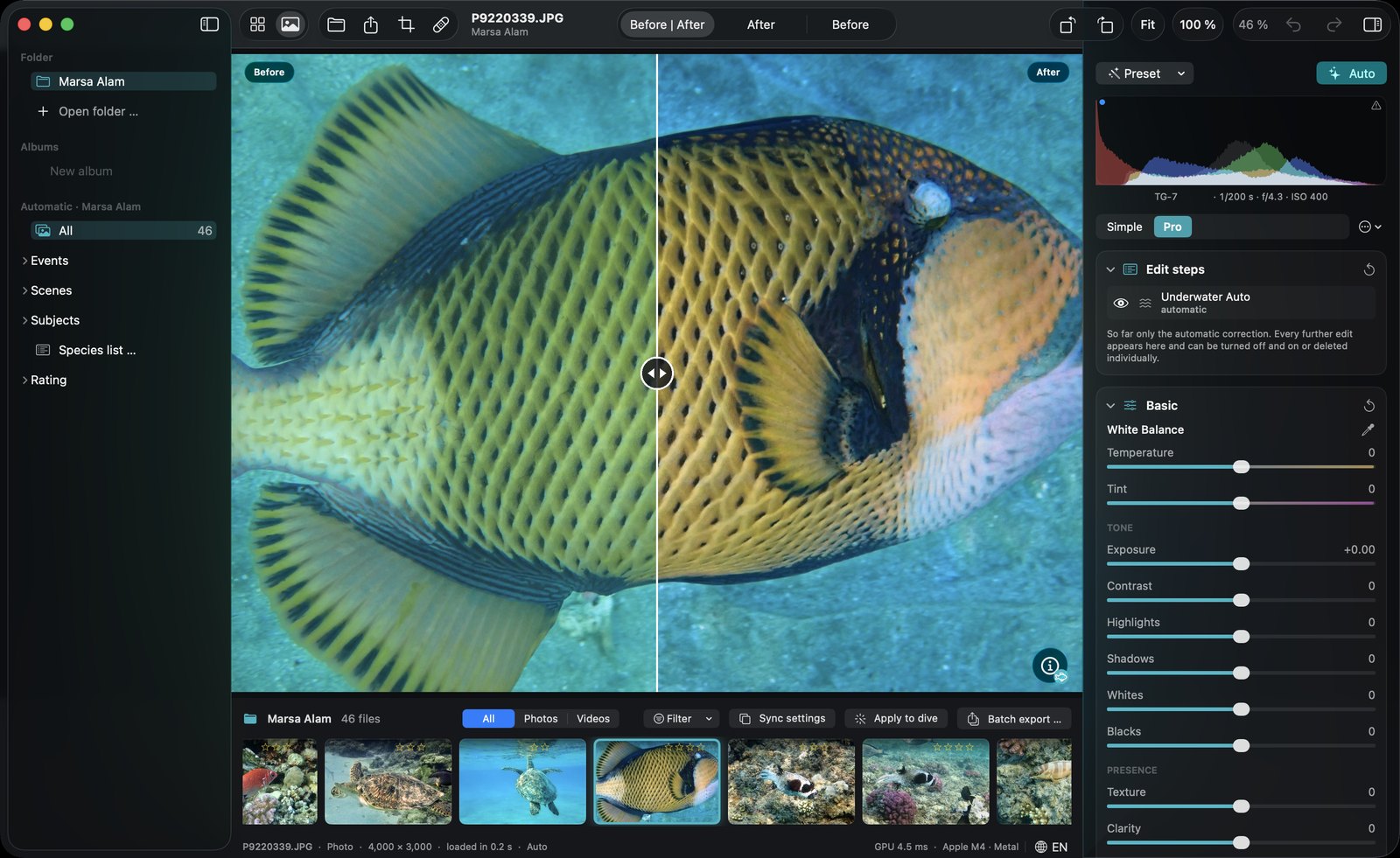
- White balance Temperature, tint and an eyedropper that measures the corrected result.
- Tone Exposure, contrast, highlights, shadows, whites, blacks.
- Presence Texture, clarity, dehaze, vibrance, saturation.
- Tone curve RGB plus separate red, green and blue curves, with presets.
- Color mixer Hue, saturation and luminance for 8 color ranges — e.g. shift aqua towards blue for deep blue water.
- Color grading Shadows, midtones and highlights wheels with blending and balance.
- Detail Sharpening, noise reduction, color noise reduction.
- Lens Chromatic aberration and defringe — for the color fringes flat ports and wide-angle lenses produce.
- Effects Vignette and film grain.
- Histogram With clipping warning for highlights and shadows.
- Color tipping warning Shows over-corrected colors as magenta stripes (key K): blue turning lime, green turning turquoise, yellow turning green.
- Denoise network Own neural network for high-ISO underwater shots, on your Mac — second training round: cleaner results with the same fine detail.
Underwater tools
- Backscatter removal Removes particles in open water only, with strength and particle size — and a view that shows the detected specks in red.
- Water & depth presets Red Sea, Caribbean / Maldives, Snorkeling, Diving, Deep, Green water / lake, Strobe / light.
- LED light preset For photos lit with a video or dive light: LED light lacks deep red, the preset brings red and orange back while the water stays blue.
- Finished photos stay finished Well-lit strobe photos are recognized as not needing a color fix — the automatic correction leaves them alone.
- Style presets Natural, Vivid, Subtle, Macro.
- Fine control Auto strength, water path, red rebuild, neutral midtones and water protection as separate sliders.
- Analysis readout Shows open water share, color cast, haze and how much red was lost.
Masks & local adjustments
Adjust only part of the image. Subject and water come from DepthLight’s own water detection; diver, animal and face masks use Apple Vision — on your Mac.
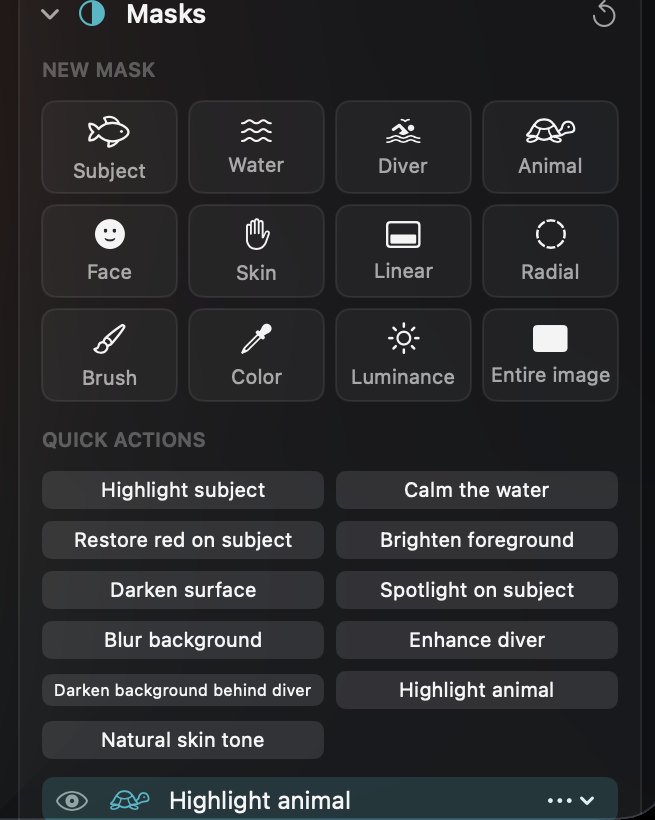
- 12 mask types Subject, Water / background, Diver / person, Animal, Face, Skin, Linear gradient, Radial gradient, Brush, Color range, Luminance range, Entire image.
- 11 quick actions Highlight subject, Calm the water, Restore red on subject, Brighten foreground, Darken surface, Spotlight on subject, Blur background, Enhance diver, Darken background behind diver, Highlight animal, Natural skin tone.
- Combine Build masks from several parts — add, subtract or intersect, each invertible.
- Brush Paint or erase with size, feather and flow.
- Gradients Move, resize and rotate directly in the image.
- Per-mask adjustments Exposure, contrast, highlights, shadows, whites, blacks, temperature, tint, restore red, saturation, clarity, dehaze, sharpness and blur.
- Blur without halos Background blur that keeps clean edges around the subject.
- Protect subject Limit any mask to the background with one switch; show any mask in red.
Retouch, crop & geometry
- Heal & clone Remove spots: heal blends texture into the surroundings, clone copies 1:1. The source is chosen automatically and can be moved.
- Crop Original, free, 1:1, 4:5, 3:2, 4:3, 16:9 and 9:16, with straighten.
- Guides Thirds, golden ratio, golden spiral, diagonals, grid.
- Rotate & flip Left, right, horizontal, vertical.
Library & explorer
Work directly in your folders — files stay where they are and are never copied. A catalog remembers ratings, flags, scenes and species.
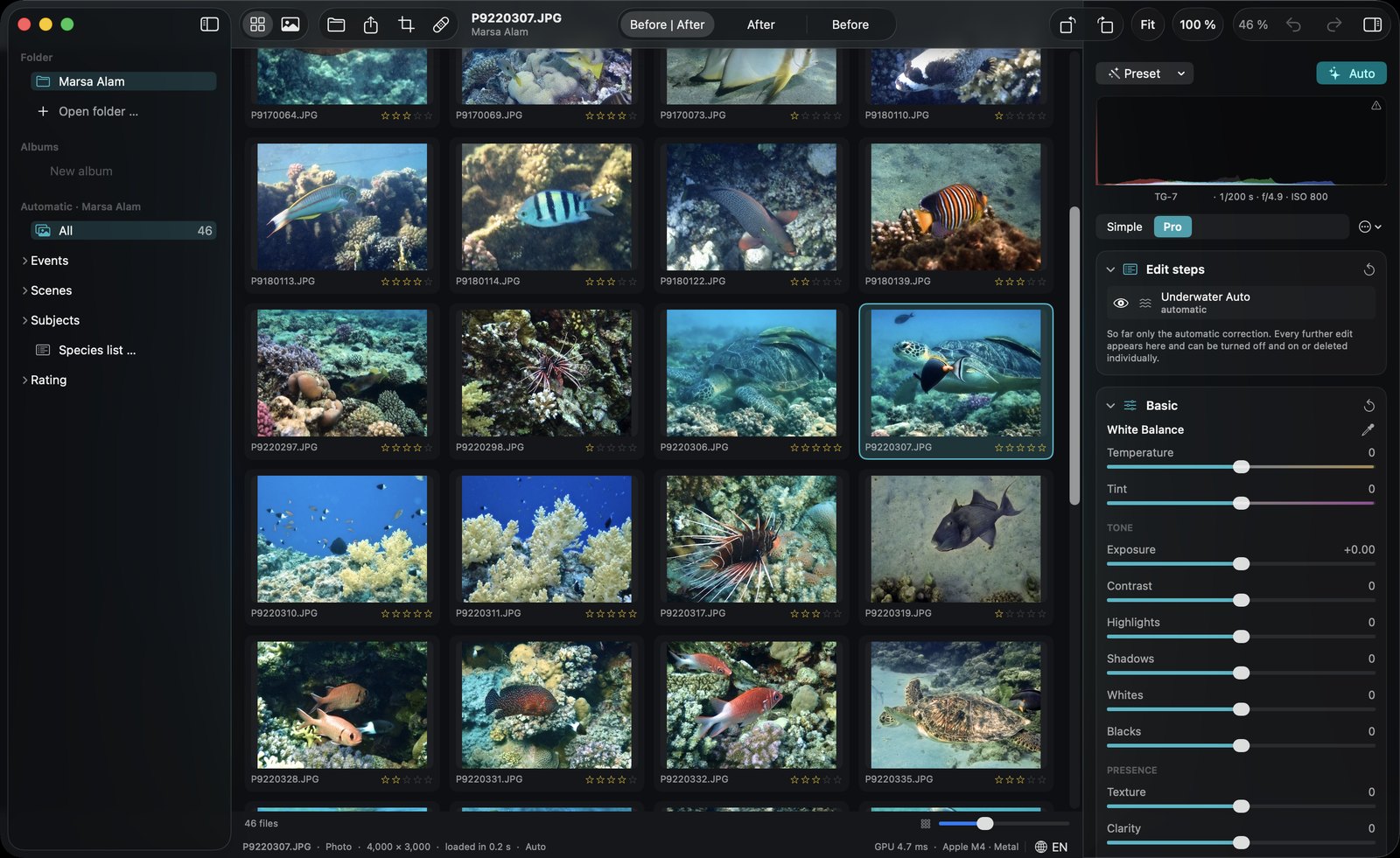
- Folders Open or drag in a folder; recent folders stay in the sidebar.
- Albums Collect photos from anywhere without copying them.
- Events = dives Photos are grouped automatically by time — a new group after a longer break.
- Scenes Reef & subject, blue water, deep (over 10 m), above water, video.
- Subjects Browse by recognized species and animals.
- Ratings & flags 0–5 stars, pick and reject — by keyboard.
- Automatic stars A quality score suggests ratings; your own rating always wins.
- Filters Minimum stars, picks only, hide rejected, photos or videos.
- Pick best Suggests the best ~15 % of each dive — judged on sharpness, exposure, color and subject, without near-duplicates.
- Framing & divers Prefers well-framed subjects; cut-off fins, closed eyes, divers cut off at the edge or only seen from behind are picked less often.
- Grid & loupe Large grid with corrected thumbnails, or single view with filmstrip.
- Formats JPEG, HEIC, TIFF, PNG, RAW and video. Opens files from Finder too.
Species recognition
DepthLight’s own recognition model, trained on reef life — not a generic image classifier. Everything runs on your Mac.
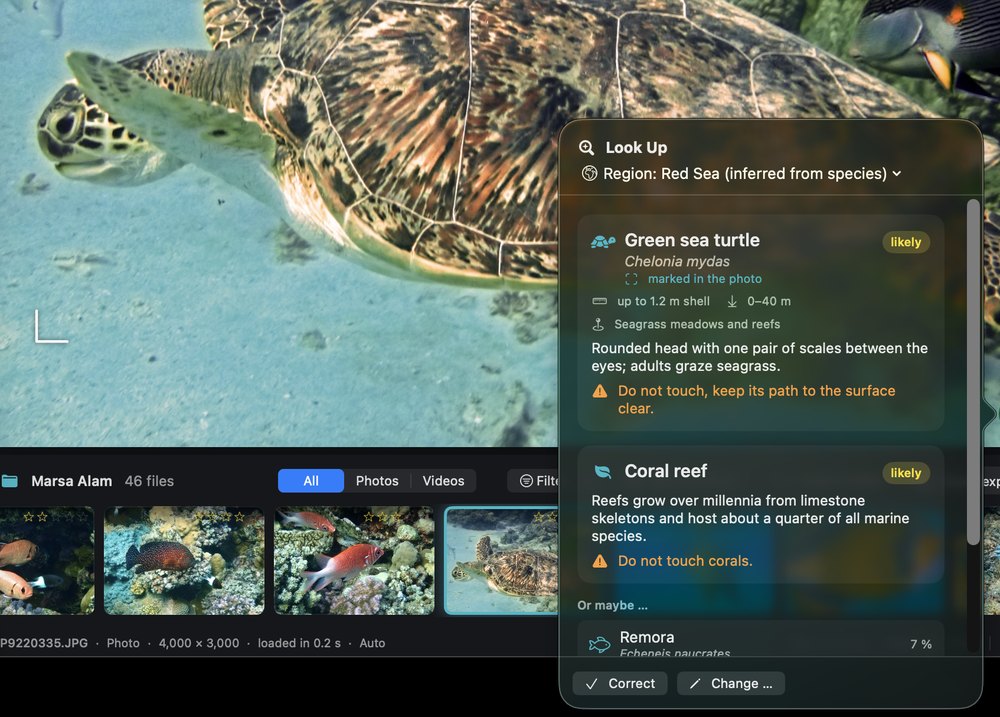
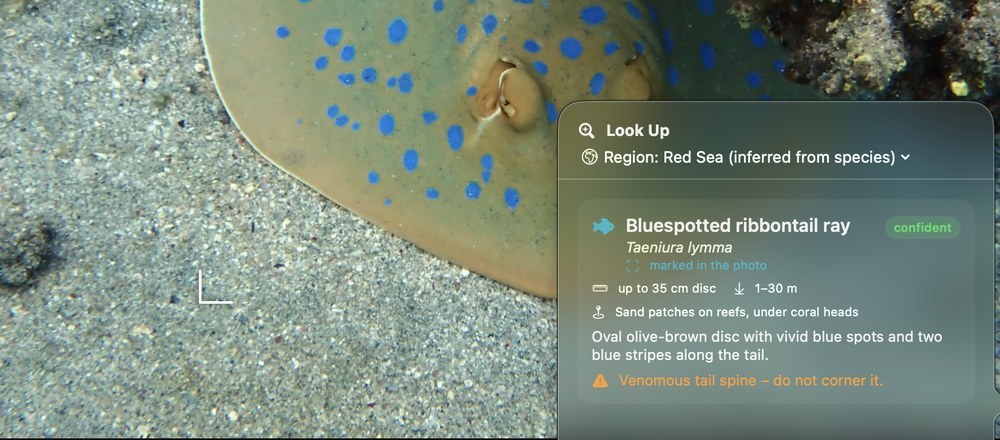
- 787 species Reef fish, corals, rays and sharks, invertebrates, turtles and marine mammals.
- Species profile Common and Latin name, size, depth range, habitat, identification notes and cautions — in English and German.
- Honest confidence Shows how sure it is, plus “Or maybe …” alternatives.
- Learns from you Confirm or change the result; similar photos follow your corrections.
- Regions Red Sea, Indo-Pacific, Caribbean, Mediterranean — from GPS, from the species seen, or set by hand.
- Species list per trip Every species of a folder or album with photo count, dives, first and last seen — exportable as CSV.
Dive tools
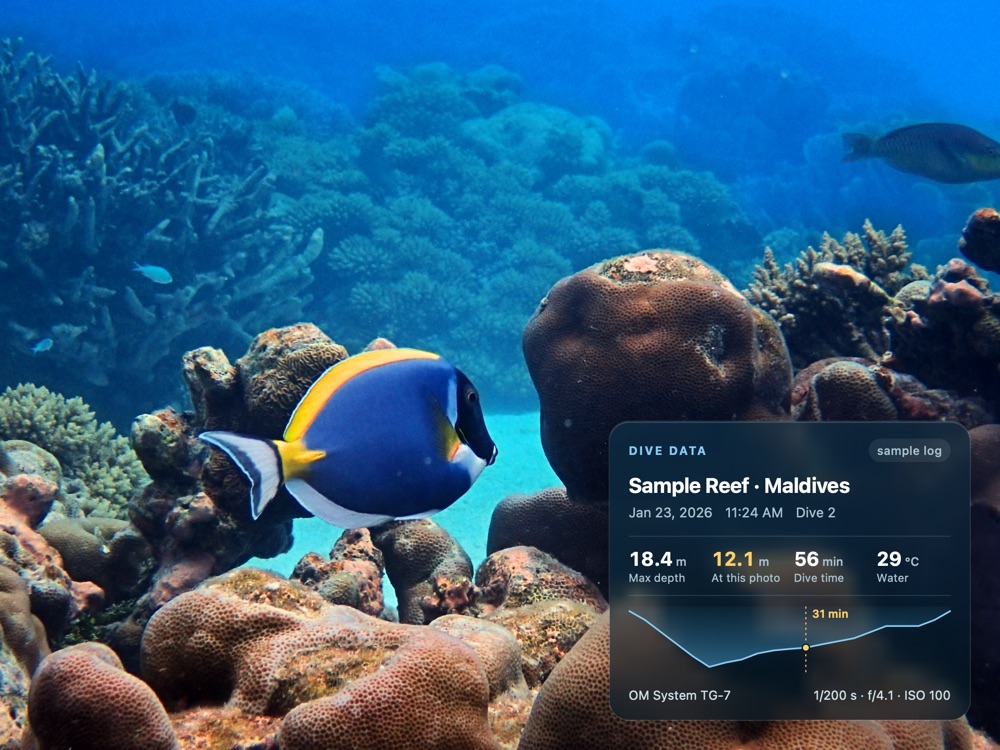
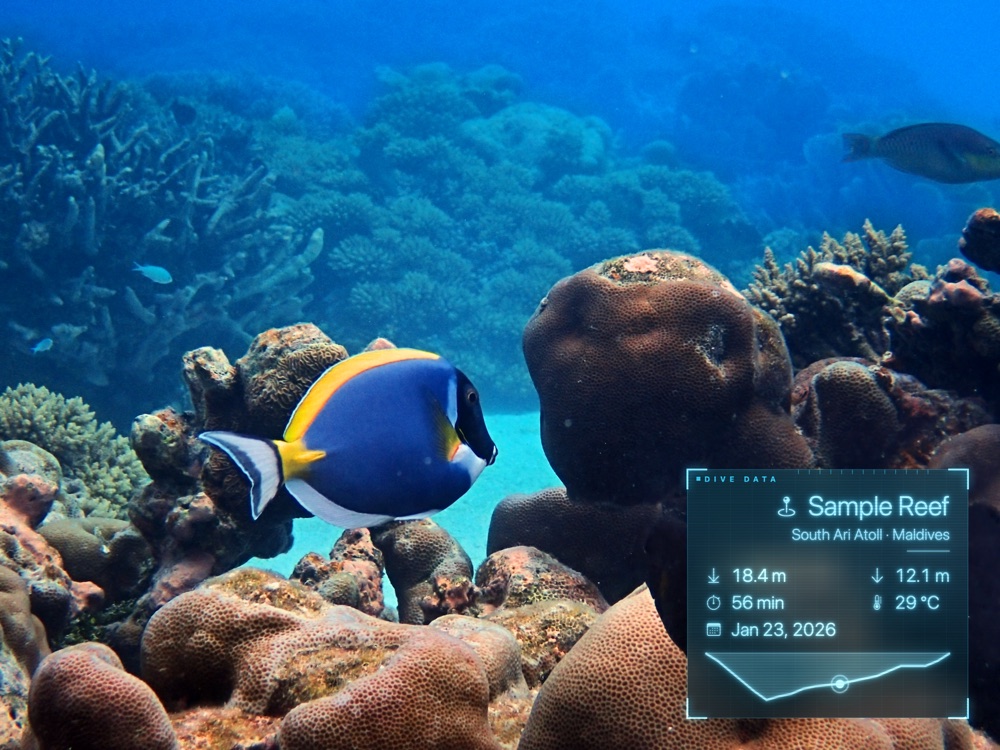
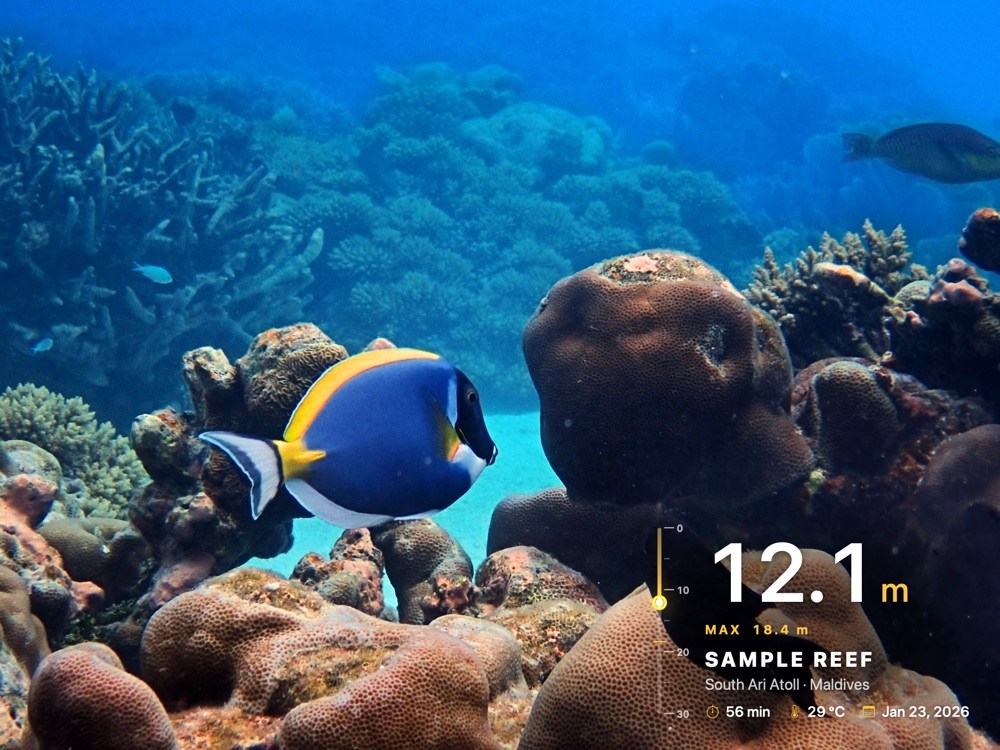
Overlay examples use sample dive data.
- Dive log import Subsurface, UDDF, Garmin FIT and Shearwater / CSV. Other dive computers via a Subsurface or UDDF export.
- Photos ↔ dives Matched by capture time, with an adjustable camera clock offset. Depth, temperature and dive data fill in automatically.
- Dive-data overlay 20 fields (site, depth, time, temperature, camera settings, dive number …), 6 styles: Dive log, Plain, Glass, Gradient, Hologram, Depth gauge. 6 positions, size, colors, glow.
- Depth profile Your dive curve in the overlay, with the moment of the photo marked.
- Logbook PDF Trip cover, dive table, one page per dive with best photos and species, plus a species page.
- Camera depth Uses the depth some cameras record (e.g. OM System TG).
- GPS from the dive computer Photos get the nearest known dive site automatically.
DiveMap
- 8,000+ dive sites Reefs, wrecks and dive spots worldwide from OpenStreetMap, offline, with search as you type and typo tolerance.
- Assign a dive site To a photo, a dive, marked photos or a whole folder — or click the spot on the map.
- One map for all folders One pin per site with its best photo and the number of dives.
- Site card Dives, photos, species, max depth, dates, best photos and every dive with time, duration, depth, temperature and profile.
- Trips Dives grouped into journeys and shown with their route.
- Species filter Only sites where a species was photographed.
- Your own spots Create, move and delete — stored on your Mac.
- Map as image 1080 × 1350 for Instagram or your logbook.
- Import & export Dive sites as GPX, GeoJSON or CSV — export for Google My Maps, Garmin or Excel; import the spot list of your dive center or your own table.
Looks & batch editing
- Your own looks Save an edit as a look — applied on top of Auto, so every photo still gets its own analysis.
- Match this look Take the mood of any reference photo and apply it to yours.
- Apply to dive Apply an edit adaptively to every photo of a dive.
- Copy, paste & sync Transfer settings to marked or all photos.
Video
- Real-time 4K Corrected playback on the GPU; Auto follows changing scenes.
- Stabilization Smooths the camera path with zoom, so no borders show.
- Highlight clip Picks the best scenes of your videos into one 15–90 s clip.
- Export HEVC 10-bit or H.264, audio passed through, dive overlay included.
Export
- Formats JPEG, HEIC, 16-bit TIFF, 16-bit PNG and linear DNG.
- DNG export The finished photo as a linear 16-bit DNG with full editing headroom — continue in Lightroom, Capture One, Preview or Photos; it opens looking exactly like your export.
- Social formats 4:5 Instagram, 9:16 Story / Reel, 1:1, 16:9.
- Before/after clip An MP4 with a moving split line — made for social media.
- Size & sharpening Long edge in pixels; output sharpening for screen, matte or glossy paper.
- Color space sRGB, Display P3, Adobe RGB.
- Metadata Keep all, all except location, copyright only, or none — camera, time, exposure and GPS stay with the photo, also when the original was RAW.
- Watermark & naming Text watermark; flexible file names.
- Batch export Current, marked or all photos.
Workflow
- Non-destructive Originals are never changed; edits are stored as a small file next to the photo.
- Undo & redo For every step.
- Before / after Split view, after, before — one key to switch.
- Keyboard first Shortcuts for ratings, crop, retouch, masks, grid, zoom and more.
- Apple Photos extension Use Auto and the main sliders right inside Photos — re-editable later.
- Your own layout Pro mode panels can be shown, hidden and reordered, and you can build your own tabs with exactly the tools you use.
- Languages English and German, switchable at any time.
Privacy & speed
- On your Mac No cloud, no account, no upload. Recognition and masks run locally.
- Built for Apple Silicon A 16-bit GPU pipeline on Metal.
- Fast On our test Mac (M4): a 12 MP photo is ready in about 0.4 s, 4K video corrects at around 58 frames per second.